

Great creative shouldn’t need to be rebuilt every time the format or market changes. Yet adapting layouts, localizing copy and managing growing asset libraries still takes up valuable time for marketing and creative teams.
With our October 2026 release, we’re introducing smarter ways to take on that work.
From AI-generated layouts that go beyond traditional resizing to translations that account for regional language differences, the latest updates make it easier to adapt your campaign content at scale. Meanwhile, new asset management capabilities help teams keep their libraries organized, connected and easier to navigate. Here’s what’s new.
Resize without the redesign with AI Resizer
Creating a new size for a campaign shouldn’t mean rebuilding the design.
Traditional resizing tools can adjust dimensions, but getting the layout right often requires manual work. Elements need repositioning, spacing needs adjusting, and every new format can become another design task.
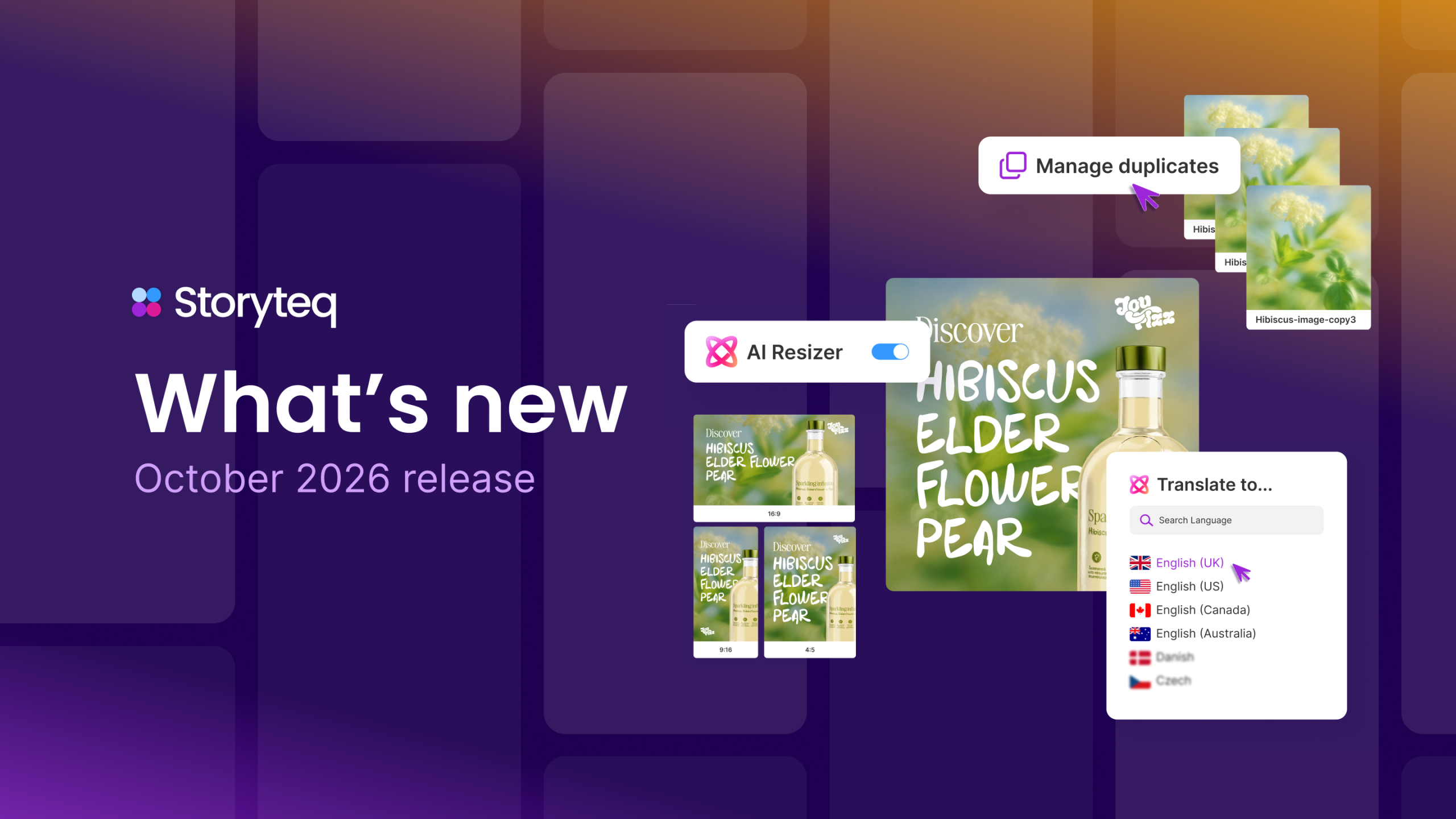
Instead of simply scaling your existing design, the new AI Resizer in Adaptation Studio intelligently rearranges elements to generate a new layout suited to your chosen dimensions, much like a designer would. This helps maintain the original creative’s composition and brand identity, without the need for extensive manual adjustments.
Whether you’re adapting a square creative into a portrait or landscape format, AI Resizer helps you create new image template sizes in seconds, with less manual repositioning and reworking.
For creative teams managing campaigns across multiple channels and placements, that means less time spent building layouts and more time available for creative work.
Speak your market’s language with dialect-aware AI translations
A translation can be technically correct and still sound wrong to a local audience.
From spelling and terminology to everyday expressions, the differences between British, American and Australian English can mean extra rounds of editing before campaign copy is ready to use.
With dialect-aware AI translations in Adaptation Studio, Storyteq now supports five regional English variants: British, American, Canadian, Australian and New Zealand English.
Instead of producing one generic English translation, teams can create digital adaptations that account for the language differences of their target market.
For brands creating content across English-speaking markets, this helps reduce repetitive corrections and makes localization more efficient, while keeping local teams involved in reviewing the final copy.
Keep your DAM cleaner and more connected
As asset libraries grow, duplicate files accumulate, related content becomes harder to track down, and finding the right asset can take longer than it should.
Two new capabilities in Content Portal, Manage Duplicates and Related & Associated Assets, help teams keep their libraries better organized and make connected content easier to find.
With Manage Duplicates, teams can check an asset against their library to identify exact duplicate files, helping reduce unnecessary clutter and making it easier to manage content with confidence.
Meanwhile, Related & Associated Assets let teams connect assets belonging to the same campaign or project and link supporting materials, such as briefs and documents, directly to the relevant content.
Together, these improvements help teams spend less time searching and make it easier to find the right content when they need it.
Make every click count with multi link zones for banners
One banner, multiple destinations. With multi link zones, teams can turn individual elements within a banner into clickable areas, each linking to a different page.
Whether you’re promoting multiple products or directing audiences to different offers, it’s a simple way to make banners more interactive without creating separate assets for every destination.
More improvements to simplify your content operations
The October release introduces a range of practical improvements to help teams find content faster, simplify collaboration, and reduce repetitive work across campaign production.
Find and organize content more easily
- Filter by file extension: Narrow down asset searches by file format, making it quicker to find exactly what you need.
- Start projects directly from your DAM: Select existing assets and create a project brief without having to add each file manually.
- Build more flexible content portals: Add resizable image galleries and create portal links that automatically direct users to the first page they have permission to access.
Keep reviews and projects moving
- Track pending reviews: Updated counter widgets help teams see how many reviews need attention and navigate directly to them.
- Re-create reviews with fewer steps: Start a new review for rejected assets directly from the resources view.
- Save progress on briefing forms: Save partially completed briefs and return to them later, with clear validation showing which fields still need attention.
From AI-powered resizing and smarter translations to more connected asset management, the October release brings new ways to reduce repetitive work and simplify content operations.
Explore the latest updates in Storyteq, or book a demo to see how our platform fits into your workflow and helps your team create, manage and scale campaign content with less effort.